
AutoAgent help
Everything AutoAgent does, and how to change it. Can't find an answer? Email hello@web-pex.com and we reply within one business day.
Start in 3 minutes
- Install AutoAgent from the Shopify App Store. It opens on Set up AutoAgent.
- Brand voice: click Write it for me. AutoAgent reads your products and writes how your brand speaks. Change anything, then save.
- Connect Facebook & Instagram: log in to Facebook and pick the Page to post to. If an Instagram Business or Creator account is linked to that Page, tick it too.
- Optional, Pinterest: in Settings, click Connect Pinterest, log in and allow AutoAgent, then choose (or create) the board your Pins go to.
- Check your first post in Up next. From now on AutoAgent posts every day at your post time (9:00 AM store time unless you change it) and publishes a blog article once a week.
Video tour
From install to a Reel live on Facebook and Instagram, on a real store, in 90 seconds.
Home and Up next
- Autopilot card: Running, Paused or Needs attention, when the next post goes out, and which channels are on. Pause stops scheduled posts; Post now posts the next post straight away (it then counts as that day's post).
- Up next → Social post: the next post exactly as followers will see it. Switch between Facebook and Instagram: each has its own caption.
- Up next → Blog article: the week's article (see below). A yellow Needs your OK means it waits for your approval.
- At a glance counts posts and articles; Recent posts links to each post live on Facebook, Instagram and your blog.
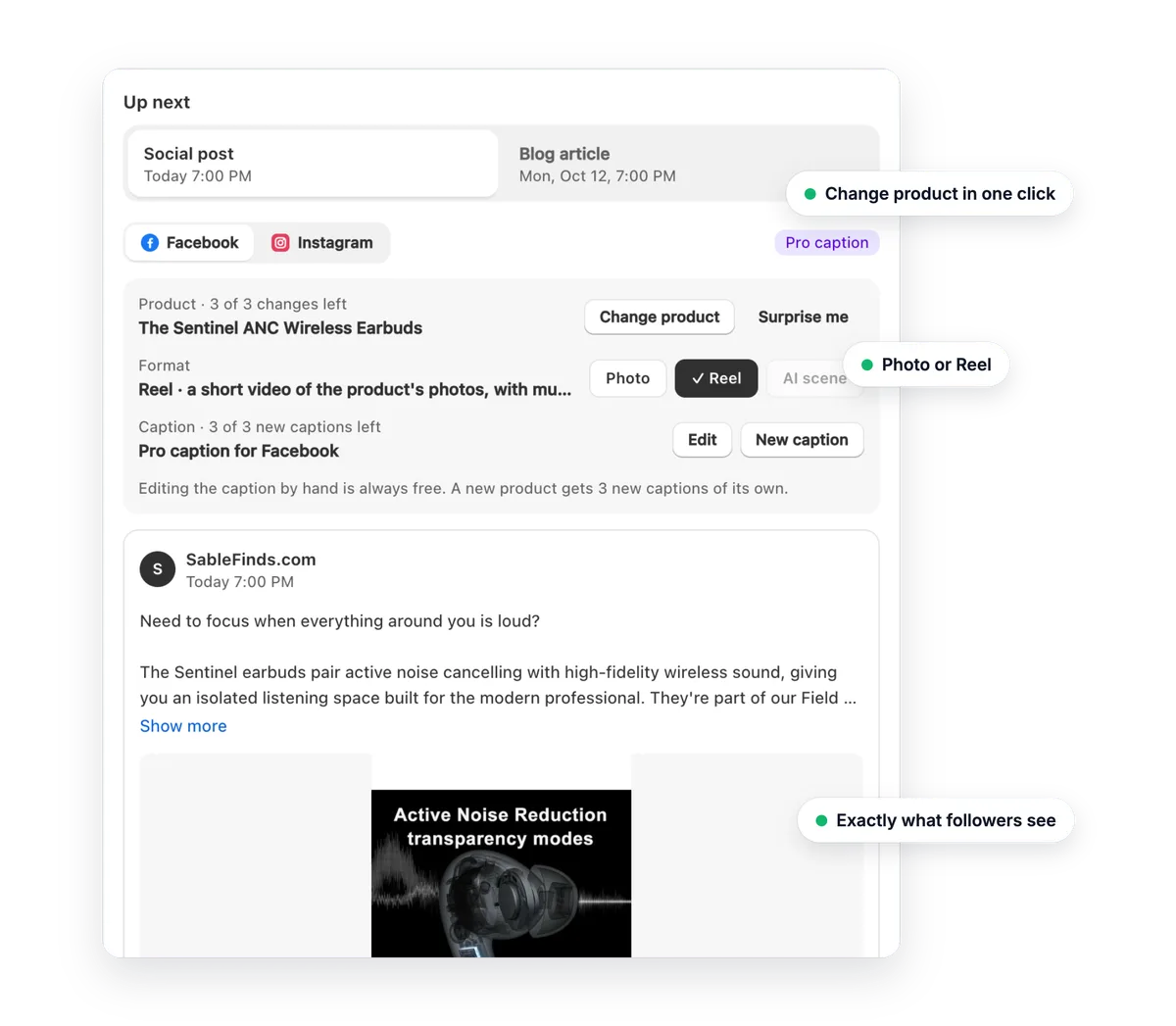
Change a post
| What | How | Limit |
|---|---|---|
| Product | Change product (Shopify's product picker) or Surprise me | 3 changes per post |
| Format | Photo, Reel or AI scene (Pro) | Reels: 4 a month Free, 12 Pro |
| Caption | Edit by hand, or New caption | Editing is unlimited; 3 new captions per product |
| Skip | Skip on Facebook (or Instagram); ··· → Skip both. Undo appears straight after. | None |
Reels
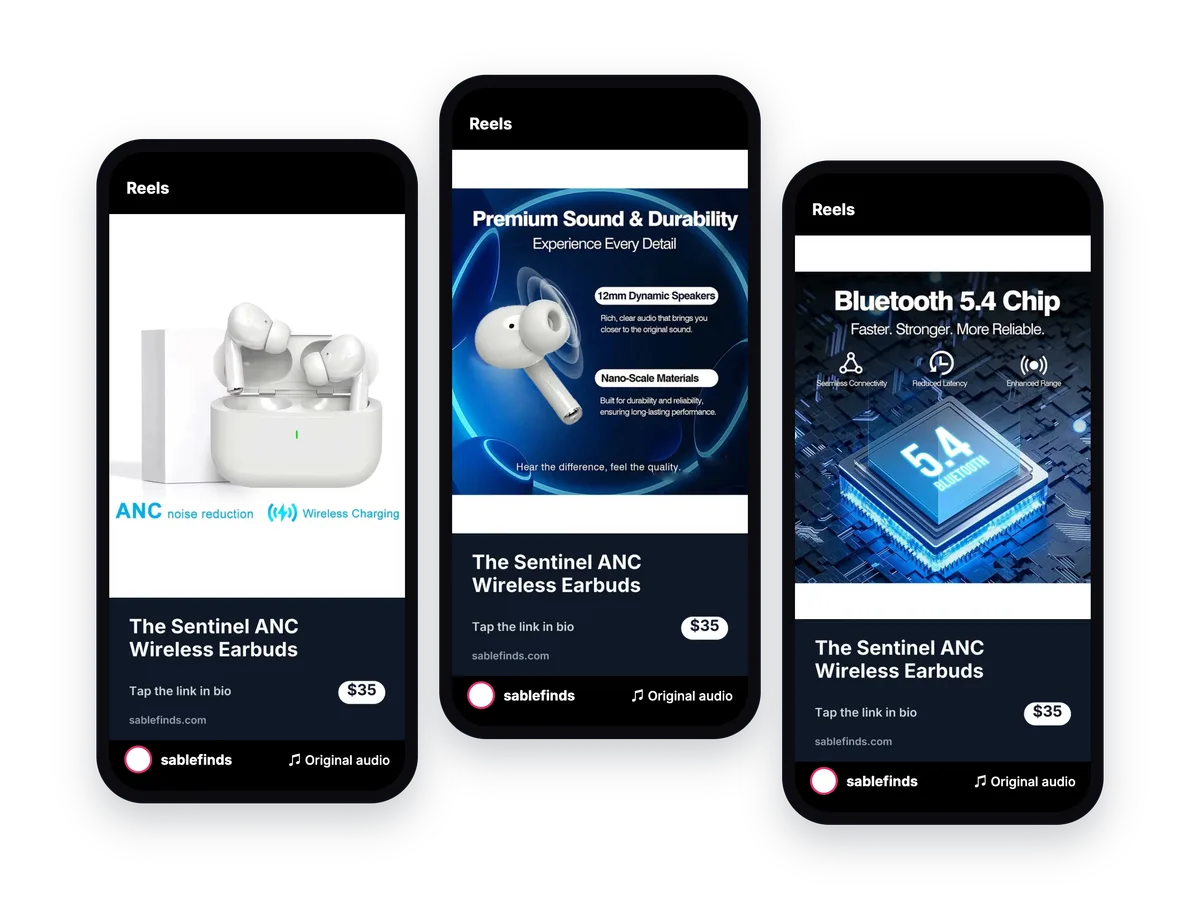
- A Reel is a short video of your product's photos with its name, price, your logo and music. AutoAgent makes it itself; no filming or editing.
- Some daily posts become Reels automatically, spread over the month: 4 a month on Free, 12 on Pro. Make any product post a Reel with Format → Reel (about 30 seconds), or switch back to Photo.
- Turn Reels off in Settings → What to post.
Weekly blog article
- Each week AutoAgent researches a real Google search around your products, writes an article and saves it as a hidden draft in your Shopify blog, ready a week ahead.
- In the Blog article tab: Read full article, Edit in Shopify, Different topic (3 per article), Skip this week, or ··· → Publish now.
- It publishes on your blog day at your post time. To approve each article first: Settings → More options → Wait for my approval.
When posts go out
- One social post a day at your Daily post time, in your store's timezone; the blog article on your Weekly blog day at the same time (Settings → Schedule).
- About 1 in 5 daily posts is a brand post (a tip, fact, question or quote in your brand voice) so your feed isn't only products. Turn it off in Settings → What to post.
- AutoAgent picks a different product each day and avoids products posted in the last two weeks.
Pro posts and plans
A Pro post has an expert caption written separately for Facebook and Instagram and a branded image with your product name, price and logo. It only counts when it actually goes out: skipped or failed posts come back.
| Plan | Price | Includes |
|---|---|---|
| Free | $0 | Daily posts, weekly blog article, 4 Reels and 3 Pro posts a month, preview every post |
| Pro | $19 a month, 7-day free trial | An expert caption on every post, a Reel with every product post, branded photos and AI scenes of your products, everything in Starter |
- Pro posts refill on the 1st of each month and don't carry over. During the trial you get 15 Pro posts; the full 150 arrive with the first payment.
- AI scene (Pro): your product in a styled photo. You approve it before it posts; if you don't, the normal photo goes out. An AI scene or an extra Reel uses 1½ Pro posts.
- Upgrade with Upgrade to Pro on Home; change or cancel in Settings → Manage plan. Billing is by Shopify, on your Shopify invoice.
Settings
- Connected accounts: your Facebook Page, Instagram, Pinterest board and blog; Manage connections to switch Page or reconnect.
- Your brand: tone of voice, brand voice, logo and colour (used on branded images, brand posts and Reels).
- Schedule: post time, blog day and which blog. Use the Save bar at the top.
- What to post: switches for Facebook, Instagram, Pinterest Pins, blog articles, Reels and brand posts (saved straight away).
- More options: blog approval, Telegram, email updates, disconnect Facebook.
Telegram
Settings → More options → Connect Telegram, then tap Start in Telegram. You get a message when something posts or needs you, and you can send:
/post: post to Facebook & Instagram now/blog "topic": write and publish a blog article (topic optional)/status: recent runs;/usage: Pro posts and Reels left this month/stop: unlink the chat;/help: all commands
Troubleshooting
Instagram isn't posting
Instagram must be a Business or Creator account linked to your Facebook Page. In the Instagram app: Settings → Account type and tools → Switch to professional account, then link it to your Page in Meta Business Suite. Then open AutoAgent → Settings → Manage connections → Switch Page, and tick the Instagram account in the Facebook window.
"Facebook is disconnected" (red status)
Facebook stopped accepting AutoAgent's access, usually after a Facebook password change or if AutoAgent was removed in your Facebook settings. Click Reconnect Facebook on Home and pick your Page again. Your settings and history are kept.
Yesterday's post didn't go out
Home shows the reason in a red banner with Try again now. Most problems are fixed by reconnecting Facebook. If you linked Telegram, you also get a message when a post fails.
I asked for a Reel but a photo was posted
If Facebook or Instagram won't take a Reel, AutoAgent posts the photo instead so your day isn't lost, and the Reel doesn't count against your month.
"Change product" or "New caption" is greyed out
Each post allows 3 product changes and 3 new captions per product. You can still edit the caption by hand as often as you like, or skip the post. The next post starts fresh.
The post went out at a different time
Times follow your store's timezone (Shopify → Settings → General). Home says "(store time)" when your computer is in another timezone. Posts go out at your post time, occasionally a little later.
The blog topic looks general
Click Different topic (3 left) in the Blog article tab. AutoAgent researches again from real Google searches around your products.
"Something went wrong" after an update
Reload the whole browser tab (Cmd+R or Ctrl+R). If it stays, email us with the time it happened.
FAQ
Is there really a free plan?
Yes. Free posts every day to Facebook, Instagram and Pinterest, writes a weekly blog article, makes 4 Reels a month and includes 3 Pro posts a month. No card needed.
How do Pinterest Pins work?
On every plan, each day's product post is also pinned to the board you chose: same image, the product name as the title, the Facebook caption without hashtags as the description, and a link to the product page. Pins need Facebook or Instagram connected too. Turn Pins off any time in Settings → What to post.
Does AutoAgent change my products or theme?
No. It reads your products to write posts, and creates blog articles on your blog. It never edits your products, prices, collections, theme or pages.
Can I check posts before they go out?
Yes. The next post is always in Up next, exactly as it will look. Change it, skip it, or post it now. Blog articles can wait for your approval (Settings → More options).
How do I cancel Pro?
Settings → Pro posts → Manage plan → choose Free. You keep posting on Free. Unused Pro posts don't carry over.
Do my customers' details go anywhere?
No. AutoAgent never reads customer names, emails, addresses or orders. See the privacy policy.
What happens if I uninstall?
Your Facebook connection, settings and prepared posts are deleted straight away; everything else when Shopify asks us to, within 48 hours. Posts already published stay on your Page, Instagram and blog.
Contact support
Email hello@web-pex.com with your store address (yourstore.myshopify.com) and, if something broke, the time it happened. We reply within one business day. Feature ideas are welcome too.
Policies: Privacy policy · Terms of service